> ## Documentation Index
> Fetch the complete documentation index at: https://code.claude.com/docs/llms.txt
> Use this file to discover all available pages before exploring further.
# 自訂您的狀態列
> 設定自訂狀態列以監控 Claude Code 中的 context window 使用情況、成本和 git 狀態
狀態列是 Claude Code 底部的可自訂列,可執行您設定的任何 shell 指令碼。它透過 stdin 接收 JSON 工作階段資料,並顯示您的指令碼列印的任何內容,為您提供 context 使用情況、成本、git 狀態或任何其他您想追蹤的內容的持久、一目瞭然的檢視。
狀態列在以下情況下很有用:
* 您想在工作時監控 context window 使用情況
* 您需要追蹤工作階段成本
* 您跨多個工作階段工作,需要區分它們
* 您希望 git 分支和狀態始終可見
狀態列會在內建頁尾徽章上方的自己的列中呈現,不會取代它們。使用自訂狀態列設定後,Claude Code 會停止顯示頁尾的大部分鍵盤提示,包括 `esc to interrupt`、`? for shortcuts` 後備選項,以及 `hold space to speak` [語音聽寫](/docs/zh-TW/voice-dictation)提示。若要在對話中出現 ID 時在頁尾新增可點擊的連結徽章,而不需要撰寫指令碼,請改為設定 [`footerLinksRegexes`](/docs/zh-TW/settings-reference#footerlinksregexes)。
以下是一個[多行狀態列](#display-multiple-lines)的範例,在第一行顯示 git 資訊,在第二行顯示顏色編碼的 context 列。
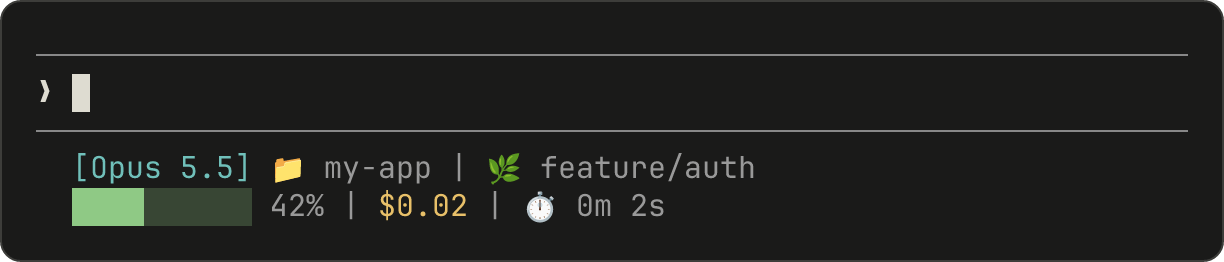 本頁面介紹[設定基本狀態列](#set-up-a-status-line)、說明[資料如何從 Claude Code 流向您的指令碼](#how-status-lines-work)、列出[您可以顯示的所有欄位](#available-data),並提供[常見模式的現成範例](#examples),例如 git 狀態、成本追蹤和進度列。
設定狀態列
使用[`/statusline` 命令](#use-the-%2Fstatusline-command)讓 Claude Code 為您產生指令碼,或[手動建立指令碼](#manually-configure-a-status-line)並將其新增到您的設定。
使用 /statusline 命令
`/statusline` 命令接受描述您想顯示內容的自然語言指令。Claude Code 在 `~/.claude/` 中產生指令碼檔案並自動更新您的設定:
```text theme={null}
/statusline show model name and context percentage with a progress bar
```
如果 Claude Code 在設定期間要求許可,請核准檔案編輯提示。
將 `statusLine` 欄位新增到您的使用者設定(`~/.claude/settings.json`,其中 `~` 是您的主目錄)或[專案設定](/docs/zh-TW/settings#where-settings-live)。將 `type` 設定為 `"command"`,並將 `command` 指向指令碼路徑或內聯 shell 命令。如需建立指令碼的完整逐步說明,請參閱[逐步建立狀態列](#build-a-status-line-step-by-step)。
```json theme={null}
{
"statusLine": {
"type": "command",
"command": "~/.claude/statusline.sh",
"padding": 2
}
}
```
`command` 欄位在 shell 中執行,因此您也可以使用內聯命令而不是指令碼檔案。此範例使用 `jq` 解析 JSON 輸入並顯示模型名稱和 context 百分比:
```json theme={null}
{
"statusLine": {
"type": "command",
"command": "jq -r '\"[\\(.model.display_name)] \\(.context_window.used_percentage // 0)% context\"'"
}
}
```
可選的 `padding` 欄位為狀態列內容新增額外的水平間距(以字元為單位)。預設為 `0`。此填充是在介面的內建間距之外,因此它控制相對縮排而不是距離終端邊緣的絕對距離。
可選的 `refreshInterval` 欄位除了[事件驅動的更新](#how-status-lines-work)外,每 N 秒重新執行一次您的命令。最小值為 `1`。當您的狀態列顯示基於時間的資料(例如時鐘)或背景子代理在主工作階段閒置時變更 git 狀態時,請設定此項。保持未設定以僅在事件上執行。
可選的 `hideVimModeIndicator` 欄位會隱藏提示下方的內建 `-- INSERT --` 文字。當您的指令碼自行呈現 [`vim.mode`](#available-data) 時,請將此設定為 `true`,以便模式不會顯示兩次。
停用狀態列
執行 `/statusline` 並要求它移除或清除您的狀態列(例如 `/statusline delete`、`/statusline clear`、`/statusline remove it`)。您也可以手動從 settings.json 中刪除 `statusLine` 欄位。
逐步建立狀態列
此逐步說明透過手動建立顯示目前模型、工作目錄和 context window 使用百分比的狀態列來展示 `/statusline` 為您設定的內容。
使用 [`/statusline`](#use-the-%2Fstatusline-command) 和您想要的內容描述會自動為您設定所有這些。
這些範例使用 Bash 指令碼,適用於 macOS 和 Linux。在 Windows 上,請參閱 [Windows 設定](#windows-configuration)以取得 PowerShell 和 Git Bash 範例。
 Claude Code 透過 stdin 將 JSON 資料傳送到您的指令碼。此指令碼使用 [`jq`](https://jqlang.org/)(一個您可能需要安裝的命令列 JSON 解析器)來提取模型名稱、目錄和 context 百分比,然後列印格式化的行。
將此儲存到 `~/.claude/statusline.sh`(其中 `~` 是您的主目錄,例如 macOS 上的 `/Users/username` 或 Linux 上的 `/home/username`):
```bash theme={null}
#!/bin/bash
# Read JSON data that Claude Code sends to stdin
input=$(cat)
# Extract fields using jq
MODEL=$(echo "$input" | jq -r '.model.display_name')
DIR=$(echo "$input" | jq -r '.workspace.current_dir')
# The "// 0" provides a fallback if the field is null
PCT=$(echo "$input" | jq -r '.context_window.used_percentage // 0' | cut -d. -f1)
# Output the status line - ${DIR##*/} extracts just the folder name
echo "[$MODEL] 📁 ${DIR##*/} | ${PCT}% context"
```
將指令碼標記為可執行,以便您的 shell 可以執行它:
```bash theme={null}
chmod +x ~/.claude/statusline.sh
```
告訴 Claude Code 執行您的指令碼作為狀態列。將此設定新增到 `~/.claude/settings.json`,它將 `type` 設定為 `"command"`(意思是「執行此 shell 命令」)並將 `command` 指向您的指令碼:
```json theme={null}
{
"statusLine": {
"type": "command",
"command": "~/.claude/statusline.sh"
}
}
```
您的狀態列出現在介面底部。Claude Code 會自動重新載入設定,並在您儲存檔案後立即執行您的指令碼。
Claude Code 透過 stdin 將 JSON 資料傳送到您的指令碼。此指令碼使用 [`jq`](https://jqlang.org/)(一個您可能需要安裝的命令列 JSON 解析器)來提取模型名稱、目錄和 context 百分比,然後列印格式化的行。
將此儲存到 `~/.claude/statusline.sh`(其中 `~` 是您的主目錄,例如 macOS 上的 `/Users/username` 或 Linux 上的 `/home/username`):
```bash theme={null}
#!/bin/bash
# Read JSON data that Claude Code sends to stdin
input=$(cat)
# Extract fields using jq
MODEL=$(echo "$input" | jq -r '.model.display_name')
DIR=$(echo "$input" | jq -r '.workspace.current_dir')
# The "// 0" provides a fallback if the field is null
PCT=$(echo "$input" | jq -r '.context_window.used_percentage // 0' | cut -d. -f1)
# Output the status line - ${DIR##*/} extracts just the folder name
echo "[$MODEL] 📁 ${DIR##*/} | ${PCT}% context"
```
將指令碼標記為可執行,以便您的 shell 可以執行它:
```bash theme={null}
chmod +x ~/.claude/statusline.sh
```
告訴 Claude Code 執行您的指令碼作為狀態列。將此設定新增到 `~/.claude/settings.json`,它將 `type` 設定為 `"command"`(意思是「執行此 shell 命令」)並將 `command` 指向您的指令碼:
```json theme={null}
{
"statusLine": {
"type": "command",
"command": "~/.claude/statusline.sh"
}
}
```
您的狀態列出現在介面底部。Claude Code 會自動重新載入設定,並在您儲存檔案後立即執行您的指令碼。
狀態列的運作方式
Claude Code 會在 stdin 上執行您的指令碼,並傳入 [JSON 工作階段資料](#available-data),然後顯示指令碼列印到 stdout 的任何內容。
狀態列在本機執行,不會消耗 API token。它會在某些 UI 互動期間暫時隱藏,包括說明功能表和權限提示。
狀態列何時更新
您的指令碼會在工作階段開始時執行一次,包括當您復原工作階段時。之後,它會在以下情況下再次執行:
* 新的助理訊息到達
* `/compact` 完成
* 權限模式變更
* Vim 模式切換
* 您變更 `statusLine` 設定中的 `command`
* 如果您設定了 [`refreshInterval`](#manually-configure-a-status-line),計時器會經過
* 您的指令碼最後接收的資料中的[速率限制視窗](#rate-limit-usage)達到其 `resets_at` 時間
* 您的指令碼最後接收的資料中的[預熱提示詞快取](#prompt-cache-fields)達到其 `expires_at` 時間
Claude Code 會在 300ms 時進行去抖動,因此快速變更會批次處理,您的指令碼會在變更停止後執行一次。對 `command` 本身的變更會跳過去抖動:Claude Code 會立即執行新命令。如果在您的指令碼仍在執行時觸發新的更新,Claude Code 會取消執行中的指令碼。如果您編輯指令碼,變更會在下次更新觸發重新執行時出現。
當主工作階段閒置時,事件驅動的觸發器可能會安靜下來,例如當協調器等待背景 subagent 時。若要在閒置期間保持基於時間或外部來源的區段為最新狀態,請設定 [`refreshInterval`](#manually-configure-a-status-line) 以同時在固定計時器上重新執行命令。
您的指令碼可以輸出什麼
您的指令碼可以列印的不只是單行純文字:
* **多行**:每個 `echo` 或 `print` 陳述式會顯示為單獨的列。請參閱[多行範例](#display-multiple-lines)。
* **顏色**:使用 [ANSI 逸出碼](https://en.wikipedia.org/wiki/ANSI_escape_code#Colors),例如 `\033[32m` 表示綠色(終端機必須支援)。請參閱 [git 狀態範例](#git-status-with-colors)。
* **連結**:使用 [OSC 8 逸出序列](https://en.wikipedia.org/wiki/ANSI_escape_code#OSC) 使文字可點擊(macOS 上為 Cmd+click,Windows/Linux 上為 Ctrl+click)。需要支援超連結的終端機,例如 iTerm2、Kitty 或 WezTerm。請參閱[可點擊連結範例](#clickable-links)。
調整輸出大小以符合終端機
Claude Code 會擷取您的指令碼輸出,而不是直接將其連接到終端機,因此 `tput cols` 和語言層級的寬度偵測無法從指令碼內部讀取終端機大小。請改為讀取 `COLUMNS` 和 `LINES` 環境變數。Claude Code 會在執行您的指令碼之前將這些設定為目前的終端機尺寸。
可用資料
Claude Code 透過 stdin 將以下 JSON 欄位傳送到您的指令碼:
| 欄位 | 描述 |
| - | - |
| `model.id`, `model.display_name` | 目前的模型識別碼和顯示名稱 |
| `cwd`, `workspace.current_dir` | 目前的工作目錄。兩個欄位包含相同的值;`workspace.current_dir` 因與 `workspace.project_dir` 一致而首選。 |
| `workspace.project_dir` | 啟動 Claude Code 的目錄,如果工作階段期間工作目錄變更,可能與 `cwd` 不同 |
| `workspace.added_dirs` | 透過 `/add-dir` 或 `--add-dir` 新增的其他目錄。如果未新增任何目錄,則為空陣列 |
| `workspace.git_worktree` | 當目前目錄位於使用 `git worktree add` 建立的連結 worktree 內時的 Git worktree 名稱。在主工作樹中不存在。對任何 git worktree 都會填入,不同於 `worktree.*` 僅在 [worktree 工作階段](/docs/zh-TW/worktrees)期間出現 |
| `workspace.repo.host`, `workspace.repo.owner`, `workspace.repo.name` | 從 `origin` 遠端解析的儲存庫身分,例如 `"github.com"`、`"anthropics"`、`"claude-code"`。在 git 儲存庫外或未設定 `origin` 遠端時不存在。對於巢狀在子群組中的 gitlab.com 專案,`owner` 是包含斜線的完整命名空間路徑,例如 `"group/subgroup"`。在 v2.1.260 之前,這些專案的 `workspace.repo` 不存在 |
| `cost.total_cost_usd` | 工作階段預估成本(美元),在用戶端以清單價格計算,除非有 [`modelPricing`](/docs/zh-TW/settings-reference#modelpricing) 表生效。可能與您的實際帳單不同。當 `/clear` 開始新工作階段時重設為 \$0。在 v2.1.211 之前,總計在 `/clear` 後會保留 |
| `cost.total_duration_ms` | 自工作階段開始以來的總掛鐘時間(毫秒) |
| `cost.total_api_duration_ms` | 等待 API 回應所花費的總時間(毫秒) |
| `cost.total_lines_added`, `cost.total_lines_removed` | 變更的程式碼行數 |
| `context_window.total_input_tokens`, `context_window.total_output_tokens` | 目前在 context window 中的令牌計數,來自最近的 API 回應。輸入包括快取讀取和寫入 |
| `context_window.context_window_size` | 最大 context window 大小(令牌)。預設為 200000,或具有擴展 context 的模型為 1000000。 |
| `context_window.used_percentage` | 預先計算的已使用 context window 百分比 |
| `context_window.remaining_percentage` | 預先計算的剩餘 context window 百分比 |
| `context_window.current_usage` | 最後一次 API 呼叫中的令牌計數,在 [context window 欄位](#context-window-fields)中描述 |
| `exceeds_200k_tokens` | 最近 API 回應中的總令牌計數(輸入、快取和輸出令牌合併)是否超過 200k。這是一個固定閾值,與實際 context window 大小無關。 |
| `fast_mode` | 是否為工作階段啟用 [fast mode](/docs/zh-TW/fast-mode) |
| `effort.level` | 目前的推理努力等級(`low`、`medium`、`high`、`xhigh` 或 `max`)。反映即時工作階段值,包括工作階段中途的 `/effort` 變更。當目前模型不支援努力參數時不存在 |
| `thinking.enabled` | 是否為工作階段啟用擴展思考 |
| `rate_limits.five_hour.used_percentage`, `rate_limits.seven_day.used_percentage` | 消耗的 5 小時或 7 天速率限制的百分比,從 0 到 100 |
| `rate_limits.five_hour.resets_at`, `rate_limits.seven_day.resets_at` | 5 小時或 7 天速率限制視窗重設時的 Unix 紀元秒數 |
| `rate_limits.spend_limit.used_percentage`, `rate_limits.spend_limit.resets_at` | 在 Claude apps 閘道後面,您已使用多少支出限制,以及其期間何時重設。請參閱[支出限制欄位](#spend-limit-fields)。需要 Claude Code v2.1.251 或更新版本 |
| `rate_limits.spend_limit.used_usd`, `rate_limits.spend_limit.limit_usd`, `rate_limits.spend_limit.period` | 您以美元計的預估支出和限制,以及限制的期間。這些欄位可能不存在。請參閱[支出限制欄位](#spend-limit-fields)。Claude Code 和閘道都需要 v2.1.284 或更新版本 |
| `prompt_cache` | 工作階段的 [prompt cache](/docs/zh-TW/prompt-caching) 統計資料(針對主對話):命中率、未命中次數,以及快取是否溫暖。請參閱 [prompt cache 欄位](#prompt-cache-fields)以了解每個欄位。在主對話的第一次 API 回應之前不存在。需要 Claude Code v2.1.251 或更新版本 |
| `session_id` | 唯一的工作階段識別碼 |
| `session_name` | 工作階段名稱。使用使用 `--name` 旗標或 `/rename` 設定的自訂名稱(如果存在),否則使用 AI 產生的工作階段標題。[預設顯示名稱](/docs/zh-TW/sessions#name-your-sessions)(例如 `my-app-3f`)不會填入此欄位。當工作階段既沒有自訂名稱也沒有 AI 產生的標題時不存在 |
| `prompt_id` | 識別目前正在處理的使用者提示詞的 UUID。符合 [OpenTelemetry 事件上的 `prompt.id` 屬性](/docs/zh-TW/monitoring-usage#event-correlation-attributes)。在第一次使用者輸入之前不存在 |
| `transcript_path` | 對話記錄檔案的路徑 |
| `version` | Claude Code 版本 |
| `output_style.name` | 目前輸出樣式的名稱 |
| `vim.mode` | 啟用 [vim 模式](/docs/zh-TW/interactive-mode#vim-editor-mode)時的目前 vim 模式(`NORMAL`、`INSERT`、`VISUAL` 或 `VISUAL LINE`) |
| `agent.name` | 使用 `--agent` 旗標或設定的代理設定執行時的代理名稱 |
| `pr.number`, `pr.url` | 目前分支的開啟提取請求。鏡像底部狀態列中的 PR 徽章。在具有 GitLab 遠端的儲存庫中,Claude Code 改為從分支的開啟 [merge request](/docs/zh-TW/interactive-mode#gitlab-merge-requests) 填入這些欄位,因此 `pr.number` 是 merge request 編號。Merge request 資料需要 Claude Code v2.1.234 或更新版本。當不在 git 儲存庫中、在找到提取請求或 merge request 之前,或一旦它合併或關閉後不存在 |
| `pr.review_state` | 開啟 PR 的審查狀態:`approved`、`pending`、`changes_requested` 或 `draft`。即使 `pr` 存在,也可能獨立不存在 |
| `pr.kind` | 當 `pr` 描述 [GitLab merge request](/docs/zh-TW/interactive-mode#gitlab-merge-requests)時為 `mr`。對於 GitHub 提取請求不存在,因此在此欄位之前編寫的指令碼可繼續運作。對於 merge request,當 GitLab 報告它可合併時,Claude Code 將 `review_state` 設定為 `approved`,對於任何其他開啟狀態設定為 `pending`,對於草稿設定為 `draft`。需要 Claude Code v2.1.234 或更新版本 |
| `worktree.name` | 作用中 worktree 的名稱。僅在 [worktree 工作階段](/docs/zh-TW/worktrees)期間出現 |
| `worktree.path` | worktree 目錄的絕對路徑 |
| `worktree.branch` | worktree 的 Git 分支名稱(例如 `"worktree-my-feature"`)。對於基於 hook 的 worktree 不存在 |
| `worktree.original_cwd` | Claude 進入 worktree 之前所在的目錄 |
| `worktree.original_branch` | 進入 worktree 之前簽出的 Git 分支。對於基於 hook 的 worktree 不存在 |
您的狀態列命令透過 stdin 接收此 JSON 結構:
```json theme={null}
{
"cwd": "/current/working/directory",
"session_id": "abc123...",
"session_name": "my-session",
"prompt_id": "550e8400-e29b-41d4-a716-446655440000",
"transcript_path": "/path/to/transcript.jsonl",
"model": {
"id": "claude-opus-5-5",
"display_name": "Opus"
},
"workspace": {
"current_dir": "/current/working/directory",
"project_dir": "/original/project/directory",
"added_dirs": [],
"git_worktree": "feature-xyz",
"repo": {
"host": "github.com",
"owner": "anthropics",
"name": "claude-code"
}
},
"version": "2.1.90",
"output_style": {
"name": "default"
},
"cost": {
"total_cost_usd": 0.01234,
"total_duration_ms": 45000,
"total_api_duration_ms": 2300,
"total_lines_added": 156,
"total_lines_removed": 23
},
"context_window": {
"total_input_tokens": 15500,
"total_output_tokens": 1200,
"context_window_size": 200000,
"used_percentage": 8,
"remaining_percentage": 92,
"current_usage": {
"input_tokens": 8500,
"output_tokens": 1200,
"cache_creation_input_tokens": 5000,
"cache_read_input_tokens": 2000
}
},
"exceeds_200k_tokens": false,
"prompt_cache": {
"warm": true,
"caching_observed": true,
"ttl": "1h",
"expires_at": 1738429200,
"requests": 14,
"misses": 2,
"expected_rebuilds": 1,
"hit_ratio": 0.91,
"cache_write_tokens": 352000,
"miss_recache_tokens": 310200,
"last_miss_at": 1738425230,
"last_miss_cause": {
"causes": ["tools_changed"],
"tools_added": 2,
"tools_removed": 0
},
"miss_causes": {
"tools_changed": 2
},
"recache_tokens_if_cold": 45000
},
"fast_mode": false,
"effort": {
"level": "high"
},
"thinking": {
"enabled": true
},
"rate_limits": {
"five_hour": {
"used_percentage": 23.5,
"resets_at": 1738425600
},
"seven_day": {
"used_percentage": 41.2,
"resets_at": 1738857600
},
"spend_limit": {
"used_percentage": 62.8,
"resets_at": 1740787200,
"used_usd": 314.12,
"limit_usd": 500,
"period": "monthly"
}
},
"vim": {
"mode": "NORMAL"
},
"agent": {
"name": "security-reviewer"
},
"pr": {
"number": 1234,
"url": "https://github.com/anthropics/claude-code/pull/1234",
"review_state": "pending"
},
"worktree": {
"name": "my-feature",
"path": "/path/to/.claude/worktrees/my-feature",
"branch": "worktree-my-feature",
"original_cwd": "/path/to/project",
"original_branch": "main"
}
}
```
**可能不存在的欄位**(不在 JSON 中):
* `session_name`:當使用 `--name` 或 `/rename` 設定自訂名稱時出現,或一旦存在 AI 產生的工作階段標題。預設顯示名稱(例如 `my-app-3f`)不會填入此欄位
* `prompt_id`:僅在第一次使用者輸入後出現
* `workspace.git_worktree`:僅當目前目錄位於連結 git worktree 內時出現
* `workspace.repo`:僅在 git 儲存庫內且設定了 `origin` 遠端時出現
* `effort`:僅當目前模型支援推理努力參數時出現
* `vim`:僅在啟用 vim 模式時出現
* `agent`:僅在使用 `--agent` 旗標或設定的代理設定執行時出現
* `pr`:僅在為目前分支找到開啟 PR 或 GitLab merge request 時出現,一旦它合併或關閉就會移除。`pr.review_state` 和 `pr.kind` 可能獨立不存在
* `worktree`:僅在 [worktree 工作階段](/docs/zh-TW/worktrees)期間出現。存在時,對於基於 hook 的 worktree,`branch` 和 `original_branch` 也可能不存在
* `rate_limits`:僅對 Claude.ai Pro 和 Max 訂閱者,或在設定支出限制的 Claude apps gateway 後面,以及僅在工作階段中第一次 API 回應後出現。每個視窗(`five_hour`、`seven_day`、`spend_limit`)可能獨立不存在,Claude Code 會在其 `resets_at` 時間過去後捨棄視窗。使用 `jq -r '.rate_limits.five_hour.used_percentage // empty'` 以優雅地處理不存在的情況。
* `prompt_cache`:在主對話的第一次 API 回應後出現。請參閱 [prompt cache 欄位](#prompt-cache-fields)
**可能為 `null` 的欄位**:
* `context_window.current_usage`:在工作階段中第一次 API 呼叫之前為 `null`,以及在 `/compact` 之後直到下一次 API 呼叫重新填入為止
* `context_window.used_percentage`, `context_window.remaining_percentage`:在工作階段早期可能為 `null`
在您的指令碼中使用條件存取處理遺漏的欄位,並使用後備預設值處理 null 值。
Context window 欄位
`context_window` 物件描述來自最近 API 回應的即時 context window。
* **合併總計**(`total_input_tokens`, `total_output_tokens`):目前在 context window 中的令牌。`total_input_tokens` 是 `input_tokens`、`cache_creation_input_tokens` 和 `cache_read_input_tokens` 的總和;`total_output_tokens` 是最近回應中的輸出令牌。在第一次 API 回應之前兩者都是 `0`。
* **按元件使用情況**(`current_usage`):相同的令牌計數按類別分解。當您需要將快取命中與新輸入分開時,請使用此項。
`current_usage` 物件包含:
* `input_tokens`:目前 context 中的輸入令牌
* `output_tokens`:產生的輸出令牌
* `cache_creation_input_tokens`:寫入快取的令牌
* `cache_read_input_tokens`:從快取讀取的令牌
如需了解快取欄位的含義及其計費方式,請參閱[檢查快取效能](/docs/zh-TW/prompt-caching#check-cache-performance)。
`used_percentage` 欄位僅從輸入令牌計算:`input_tokens + cache_creation_input_tokens + cache_read_input_tokens`。它不包括 `output_tokens`。
如果您從 `current_usage` 手動計算 context 百分比,請使用相同的僅輸入公式以符合 `used_percentage`。
`current_usage` 物件在工作階段中第一次 API 呼叫之前為 `null`,以及在 `/compact` 之後直到下一次 API 呼叫重新填入為止再次為 `null`。
支出限制欄位
在[設定支出限制的 Claude apps 閘道](/docs/zh-TW/claude-apps-gateway-spend-limits#usage-warnings-in-claude-code)後面,`rate_limits.spend_limit` 物件描述適用於您的支出限制。它在工作階段的第一次 API 回應後出現,且需要 Claude Code v2.1.251 或更新版本。您的指令碼會依不同的排程接收其欄位:
* `used_percentage` 和 `resets_at`:隨每個回應提供,因此只要 `spend_limit` 存在,它們就會存在。`used_percentage` 從 0 到 100,或一旦您超過限制就超過 100,而 `resets_at` 是限制期間重設時的 Unix 紀元秒數。
* `used_usd`、`limit_usd` 和 `period`:您目前為止以美元計的預估支出和限制,以及限制涵蓋的期間,為 `daily`、`weekly` 或 `monthly` 之一。閘道[從 token 計數計算 `used_usd`](/docs/zh-TW/claude-apps-gateway-spend-limits#how-requests-are-priced),因此它是預估值,而非計費金額。Claude Code 透過另一個請求從閘道讀取它們,在您傳送請求期間約每五分鐘一次。美元金額可能比 `used_percentage` 舊約五分鐘,因此兩者可能會短暫不一致。Claude Code 和閘道都需要 v2.1.284 或更新版本。
即使 `spend_limit` 存在,也請將 `used_usd`、`limit_usd` 和 `period` 視為選用。您的指令碼會先收到百分比,再收到這些欄位;如果您設定了 `CLAUDE_CODE_DISABLE_NONESSENTIAL_TRAFFIC`(會關閉該請求),這些欄位將保持不存在。請在指令碼中以備援值讀取每個欄位,例如 `jq -r '.rate_limits.spend_limit.used_usd // empty'`。
Prompt cache 欄位
`prompt_cache` 物件總結工作階段的主對話如何使用 [prompt cache](/docs/zh-TW/prompt-caching)。Claude Code 從 API 回應中的快取令牌計數計算它,因此它適用於每個提供者。
該物件在主對話的第一次 API 回應後出現。Claude Code 不會在這些統計資料中計算子代理請求。需要 Claude Code v2.1.251 或更新版本。
該表列出每個欄位及其含義。時間戳記是 Unix 紀元秒,與 `rate_limits.*.resets_at` 相同的單位。簡短的狀態列通常顯示其中一個或兩個;`warm` 和 `hit_ratio` 最直接地總結快取狀態。
| 欄位 | 描述 |
| - | - |
| `warm` | 快取的前綴是否仍在其 TTL 內。當最後一次回應未報告快取令牌時為 `false`,即使 `caching_observed` 為 `true` |
| `caching_observed` | 此工作階段的任何回應是否報告快取令牌。`false` 表示 prompt caching 已關閉,或您的提供者或 gateway 不報告它 |
| `ttl` | 目前快取前綴的 [cache lifetime](/docs/zh-TW/prompt-caching#cache-lifetime):`"5m"` 或 `"1h"` |
| `expires_at` | 快取的前綴何時離開其 TTL 並變冷,以紀元秒為單位。當最後一次回應未報告快取令牌時為 `null` |
| `requests` | 此工作階段中為主對話記錄的 API 請求 |
| `misses` | 重新處理快取已保留內容的請求:超過 5% 且至少 2,000 個令牌的請求可能已從快取讀取,沒有壓縮或工具結果清除來解釋快取讀取的不足 |
| `expected_rebuilds` | 遵循壓縮或清除舊工具結果的快取重建 |
| `hit_ratio` | 快取讀取令牌作為此工作階段所有輸入令牌的分數,從 0 到 1。分母計算快取讀取、快取寫入和未快取輸入。當這些計數都為零時為 `null` |
| `cache_write_tokens` | 此工作階段中寫入快取的所有令牌,包括第一個請求的初始寫入 |
| `miss_recache_tokens` | 由計為未命中的請求寫入快取的令牌 |
| `last_miss_at` | 最後一次未命中發生時,以紀元秒為單位。當工作階段沒有未命中時為 `null` |
| `last_miss_cause` | Claude Code 識別為最後一次未命中可能原因的內容,在 [Last miss cause](#last-miss-cause) 下描述。需要 Claude Code v2.1.260 或更新版本 |
| `miss_causes` | 此工作階段的診斷未命中中有多少個具有每個原因,由與 `last_miss_cause` 相同的原因名稱鍵入。需要 Claude Code v2.1.260 或更新版本 |
| `recache_tokens_if_cold` | 如果快取到那時已變冷,下一個請求重新快取的令牌。在壓縮或清除舊工具結果後為 `null`,直到下一個請求記錄重寫對話的大小 |
Claude Code 在終端機上顯示相同的統計資料,在 [`/usage` 命令的 `Prompt cache (main)` 行](/docs/zh-TW/costs#prompt-cache-statistics)上。
Last miss cause
`last_miss_cause` 物件報告 Claude Code 識別為最後一次未命中可能原因的內容。其 `causes` 陣列保留一個或多個原因名稱,例如 `tools_changed`、`system_prompt_changed`、`ttl_expired_5m` 或 `likely_server_side`。該物件在工作階段的第一次未命中之前為 `null`,以及每當 Claude Code 無法識別最後一次未命中的原因時再次為 `null`。需要 Claude Code v2.1.260 或更新版本。
兩個原因將計數新增到物件:
* `tools_added` 和 `tools_removed`:使用 `tools_changed`,有多少工具被新增到或從請求中移除
* `system_char_delta`:使用 `system_prompt_changed`,系統提示長度的變化(以字元為單位)
範例
這些範例展示常見的狀態列模式。若要使用任何範例:
1. 將指令碼儲存到檔案,例如 `~/.claude/statusline.sh`(或 `.py`/`.js`)
2. 使其可執行:`chmod +x ~/.claude/statusline.sh`
3. 將路徑新增到您的[設定](#manually-configure-a-status-line)
Bash 範例使用 [`jq`](https://jqlang.org/) 來解析 JSON。Python 和 Node.js 具有內建的 JSON 解析。
Context window 使用情況
顯示目前模型和 context window 使用情況,帶有視覺進度列。每個指令碼從 stdin 讀取 JSON,提取 `used_percentage` 欄位,並建立一個 10 字元的列,其中填充的塊(▓)代表使用情況:
 ```bash Bash theme={null}
#!/bin/bash
# Read all of stdin into a variable
input=$(cat)
# Extract fields with jq, "// 0" provides fallback for null
MODEL=$(echo "$input" | jq -r '.model.display_name')
PCT=$(echo "$input" | jq -r '.context_window.used_percentage // 0' | cut -d. -f1)
# Build progress bar: printf -v creates a run of spaces, then
# ${var// /▓} replaces each space with a block character
BAR_WIDTH=10
FILLED=$((PCT * BAR_WIDTH / 100))
EMPTY=$((BAR_WIDTH - FILLED))
BAR=""
[ "$FILLED" -gt 0 ] && printf -v FILL "%${FILLED}s" && BAR="${FILL// /▓}"
[ "$EMPTY" -gt 0 ] && printf -v PAD "%${EMPTY}s" && BAR="${BAR}${PAD// /░}"
echo "[$MODEL] $BAR $PCT%"
```
```python Python theme={null}
#!/usr/bin/env python3
import json, sys
# json.load reads and parses stdin in one step
data = json.load(sys.stdin)
model = data['model']['display_name']
# "or 0" handles null values
pct = int(data.get('context_window', {}).get('used_percentage', 0) or 0)
# String multiplication builds the bar
filled = pct * 10 // 100
bar = '▓' * filled + '░' * (10 - filled)
print(f"[{model}] {bar} {pct}%")
```
```javascript Node.js theme={null}
#!/usr/bin/env node
// Node.js reads stdin asynchronously with events
let input = '';
process.stdin.on('data', chunk => input += chunk);
process.stdin.on('end', () => {
const data = JSON.parse(input);
const model = data.model.display_name;
// Optional chaining (?.) safely handles null fields
const pct = Math.floor(data.context_window?.used_percentage || 0);
// String.repeat() builds the bar
const filled = Math.floor(pct * 10 / 100);
const bar = '▓'.repeat(filled) + '░'.repeat(10 - filled);
console.log(`[${model}] ${bar} ${pct}%`);
});
```
```bash Bash theme={null}
#!/bin/bash
# Read all of stdin into a variable
input=$(cat)
# Extract fields with jq, "// 0" provides fallback for null
MODEL=$(echo "$input" | jq -r '.model.display_name')
PCT=$(echo "$input" | jq -r '.context_window.used_percentage // 0' | cut -d. -f1)
# Build progress bar: printf -v creates a run of spaces, then
# ${var// /▓} replaces each space with a block character
BAR_WIDTH=10
FILLED=$((PCT * BAR_WIDTH / 100))
EMPTY=$((BAR_WIDTH - FILLED))
BAR=""
[ "$FILLED" -gt 0 ] && printf -v FILL "%${FILLED}s" && BAR="${FILL// /▓}"
[ "$EMPTY" -gt 0 ] && printf -v PAD "%${EMPTY}s" && BAR="${BAR}${PAD// /░}"
echo "[$MODEL] $BAR $PCT%"
```
```python Python theme={null}
#!/usr/bin/env python3
import json, sys
# json.load reads and parses stdin in one step
data = json.load(sys.stdin)
model = data['model']['display_name']
# "or 0" handles null values
pct = int(data.get('context_window', {}).get('used_percentage', 0) or 0)
# String multiplication builds the bar
filled = pct * 10 // 100
bar = '▓' * filled + '░' * (10 - filled)
print(f"[{model}] {bar} {pct}%")
```
```javascript Node.js theme={null}
#!/usr/bin/env node
// Node.js reads stdin asynchronously with events
let input = '';
process.stdin.on('data', chunk => input += chunk);
process.stdin.on('end', () => {
const data = JSON.parse(input);
const model = data.model.display_name;
// Optional chaining (?.) safely handles null fields
const pct = Math.floor(data.context_window?.used_percentage || 0);
// String.repeat() builds the bar
const filled = Math.floor(pct * 10 / 100);
const bar = '▓'.repeat(filled) + '░'.repeat(10 - filled);
console.log(`[${model}] ${bar} ${pct}%`);
});
```
Git 狀態與顏色
顯示 git 分支,帶有暫存和修改檔案的顏色編碼指示器。此指令碼使用 [ANSI 逃逸碼](https://en.wikipedia.org/wiki/ANSI_escape_code#Colors)表示終端顏色:`\033[32m` 是綠色,`\033[33m` 是黃色,`\033[0m` 重設為預設值。
 每個指令碼檢查目前目錄是否是 git 儲存庫,計算暫存和修改檔案,並顯示顏色編碼的指示器:
```bash Bash theme={null}
#!/bin/bash
input=$(cat)
MODEL=$(echo "$input" | jq -r '.model.display_name')
DIR=$(echo "$input" | jq -r '.workspace.current_dir')
GREEN='\033[32m'
YELLOW='\033[33m'
RESET='\033[0m'
if git rev-parse --git-dir > /dev/null 2>&1; then
BRANCH=$(git branch --show-current 2>/dev/null)
STAGED=$(git diff --cached --numstat 2>/dev/null | wc -l | tr -d ' ')
MODIFIED=$(git diff --numstat 2>/dev/null | wc -l | tr -d ' ')
GIT_STATUS=""
[ "$STAGED" -gt 0 ] && GIT_STATUS="${GREEN}+${STAGED}${RESET}"
[ "$MODIFIED" -gt 0 ] && GIT_STATUS="${GIT_STATUS}${YELLOW}~${MODIFIED}${RESET}"
echo -e "[$MODEL] 📁 ${DIR##*/} | 🌿 $BRANCH $GIT_STATUS"
else
echo "[$MODEL] 📁 ${DIR##*/}"
fi
```
```python Python theme={null}
#!/usr/bin/env python3
import json, sys, subprocess, os
data = json.load(sys.stdin)
model = data['model']['display_name']
directory = os.path.basename(data['workspace']['current_dir'])
GREEN, YELLOW, RESET = '\033[32m', '\033[33m', '\033[0m'
try:
subprocess.check_output(['git', 'rev-parse', '--git-dir'], stderr=subprocess.DEVNULL)
branch = subprocess.check_output(['git', 'branch', '--show-current'], text=True).strip()
staged_output = subprocess.check_output(['git', 'diff', '--cached', '--numstat'], text=True).strip()
modified_output = subprocess.check_output(['git', 'diff', '--numstat'], text=True).strip()
staged = len(staged_output.split('\n')) if staged_output else 0
modified = len(modified_output.split('\n')) if modified_output else 0
git_status = f"{GREEN}+{staged}{RESET}" if staged else ""
git_status += f"{YELLOW}~{modified}{RESET}" if modified else ""
print(f"[{model}] 📁 {directory} | 🌿 {branch} {git_status}")
except:
print(f"[{model}] 📁 {directory}")
```
```javascript Node.js theme={null}
#!/usr/bin/env node
const { execSync } = require('child_process');
const path = require('path');
let input = '';
process.stdin.on('data', chunk => input += chunk);
process.stdin.on('end', () => {
const data = JSON.parse(input);
const model = data.model.display_name;
const dir = path.basename(data.workspace.current_dir);
const GREEN = '\x1b[32m', YELLOW = '\x1b[33m', RESET = '\x1b[0m';
try {
execSync('git rev-parse --git-dir', { stdio: 'ignore' });
const branch = execSync('git branch --show-current', { encoding: 'utf8' }).trim();
const staged = execSync('git diff --cached --numstat', { encoding: 'utf8' }).trim().split('\n').filter(Boolean).length;
const modified = execSync('git diff --numstat', { encoding: 'utf8' }).trim().split('\n').filter(Boolean).length;
let gitStatus = staged ? `${GREEN}+${staged}${RESET}` : '';
gitStatus += modified ? `${YELLOW}~${modified}${RESET}` : '';
console.log(`[${model}] 📁 ${dir} | 🌿 ${branch} ${gitStatus}`);
} catch {
console.log(`[${model}] 📁 ${dir}`);
}
});
```
每個指令碼檢查目前目錄是否是 git 儲存庫,計算暫存和修改檔案,並顯示顏色編碼的指示器:
```bash Bash theme={null}
#!/bin/bash
input=$(cat)
MODEL=$(echo "$input" | jq -r '.model.display_name')
DIR=$(echo "$input" | jq -r '.workspace.current_dir')
GREEN='\033[32m'
YELLOW='\033[33m'
RESET='\033[0m'
if git rev-parse --git-dir > /dev/null 2>&1; then
BRANCH=$(git branch --show-current 2>/dev/null)
STAGED=$(git diff --cached --numstat 2>/dev/null | wc -l | tr -d ' ')
MODIFIED=$(git diff --numstat 2>/dev/null | wc -l | tr -d ' ')
GIT_STATUS=""
[ "$STAGED" -gt 0 ] && GIT_STATUS="${GREEN}+${STAGED}${RESET}"
[ "$MODIFIED" -gt 0 ] && GIT_STATUS="${GIT_STATUS}${YELLOW}~${MODIFIED}${RESET}"
echo -e "[$MODEL] 📁 ${DIR##*/} | 🌿 $BRANCH $GIT_STATUS"
else
echo "[$MODEL] 📁 ${DIR##*/}"
fi
```
```python Python theme={null}
#!/usr/bin/env python3
import json, sys, subprocess, os
data = json.load(sys.stdin)
model = data['model']['display_name']
directory = os.path.basename(data['workspace']['current_dir'])
GREEN, YELLOW, RESET = '\033[32m', '\033[33m', '\033[0m'
try:
subprocess.check_output(['git', 'rev-parse', '--git-dir'], stderr=subprocess.DEVNULL)
branch = subprocess.check_output(['git', 'branch', '--show-current'], text=True).strip()
staged_output = subprocess.check_output(['git', 'diff', '--cached', '--numstat'], text=True).strip()
modified_output = subprocess.check_output(['git', 'diff', '--numstat'], text=True).strip()
staged = len(staged_output.split('\n')) if staged_output else 0
modified = len(modified_output.split('\n')) if modified_output else 0
git_status = f"{GREEN}+{staged}{RESET}" if staged else ""
git_status += f"{YELLOW}~{modified}{RESET}" if modified else ""
print(f"[{model}] 📁 {directory} | 🌿 {branch} {git_status}")
except:
print(f"[{model}] 📁 {directory}")
```
```javascript Node.js theme={null}
#!/usr/bin/env node
const { execSync } = require('child_process');
const path = require('path');
let input = '';
process.stdin.on('data', chunk => input += chunk);
process.stdin.on('end', () => {
const data = JSON.parse(input);
const model = data.model.display_name;
const dir = path.basename(data.workspace.current_dir);
const GREEN = '\x1b[32m', YELLOW = '\x1b[33m', RESET = '\x1b[0m';
try {
execSync('git rev-parse --git-dir', { stdio: 'ignore' });
const branch = execSync('git branch --show-current', { encoding: 'utf8' }).trim();
const staged = execSync('git diff --cached --numstat', { encoding: 'utf8' }).trim().split('\n').filter(Boolean).length;
const modified = execSync('git diff --numstat', { encoding: 'utf8' }).trim().split('\n').filter(Boolean).length;
let gitStatus = staged ? `${GREEN}+${staged}${RESET}` : '';
gitStatus += modified ? `${YELLOW}~${modified}${RESET}` : '';
console.log(`[${model}] 📁 ${dir} | 🌿 ${branch} ${gitStatus}`);
} catch {
console.log(`[${model}] 📁 ${dir}`);
}
});
```
成本和持續時間追蹤
追蹤您的工作階段 API 成本和經過的時間。`cost.total_cost_usd` 欄位累積目前工作階段中所有 API 呼叫的估計成本。`cost.total_duration_ms` 欄位測量自工作階段開始以來的總經過時間,而 `cost.total_api_duration_ms` 僅追蹤等待 API 回應所花費的時間。
每個指令碼將成本格式化為貨幣,並將毫秒轉換為分鐘和秒:
 ```bash Bash theme={null}
#!/bin/bash
input=$(cat)
MODEL=$(echo "$input" | jq -r '.model.display_name')
COST=$(echo "$input" | jq -r '.cost.total_cost_usd // 0')
DURATION_MS=$(echo "$input" | jq -r '.cost.total_duration_ms // 0')
COST_FMT=$(printf '$%.2f' "$COST")
DURATION_SEC=$((DURATION_MS / 1000))
MINS=$((DURATION_SEC / 60))
SECS=$((DURATION_SEC % 60))
echo "[$MODEL] 💰 $COST_FMT | ⏱️ ${MINS}m ${SECS}s"
```
```python Python theme={null}
#!/usr/bin/env python3
import json, sys
data = json.load(sys.stdin)
model = data['model']['display_name']
cost = data.get('cost', {}).get('total_cost_usd', 0) or 0
duration_ms = data.get('cost', {}).get('total_duration_ms', 0) or 0
duration_sec = duration_ms // 1000
mins, secs = duration_sec // 60, duration_sec % 60
print(f"[{model}] 💰 ${cost:.2f} | ⏱️ {mins}m {secs}s")
```
```javascript Node.js theme={null}
#!/usr/bin/env node
let input = '';
process.stdin.on('data', chunk => input += chunk);
process.stdin.on('end', () => {
const data = JSON.parse(input);
const model = data.model.display_name;
const cost = data.cost?.total_cost_usd || 0;
const durationMs = data.cost?.total_duration_ms || 0;
const durationSec = Math.floor(durationMs / 1000);
const mins = Math.floor(durationSec / 60);
const secs = durationSec % 60;
console.log(`[${model}] 💰 $${cost.toFixed(2)} | ⏱️ ${mins}m ${secs}s`);
});
```
```bash Bash theme={null}
#!/bin/bash
input=$(cat)
MODEL=$(echo "$input" | jq -r '.model.display_name')
COST=$(echo "$input" | jq -r '.cost.total_cost_usd // 0')
DURATION_MS=$(echo "$input" | jq -r '.cost.total_duration_ms // 0')
COST_FMT=$(printf '$%.2f' "$COST")
DURATION_SEC=$((DURATION_MS / 1000))
MINS=$((DURATION_SEC / 60))
SECS=$((DURATION_SEC % 60))
echo "[$MODEL] 💰 $COST_FMT | ⏱️ ${MINS}m ${SECS}s"
```
```python Python theme={null}
#!/usr/bin/env python3
import json, sys
data = json.load(sys.stdin)
model = data['model']['display_name']
cost = data.get('cost', {}).get('total_cost_usd', 0) or 0
duration_ms = data.get('cost', {}).get('total_duration_ms', 0) or 0
duration_sec = duration_ms // 1000
mins, secs = duration_sec // 60, duration_sec % 60
print(f"[{model}] 💰 ${cost:.2f} | ⏱️ {mins}m {secs}s")
```
```javascript Node.js theme={null}
#!/usr/bin/env node
let input = '';
process.stdin.on('data', chunk => input += chunk);
process.stdin.on('end', () => {
const data = JSON.parse(input);
const model = data.model.display_name;
const cost = data.cost?.total_cost_usd || 0;
const durationMs = data.cost?.total_duration_ms || 0;
const durationSec = Math.floor(durationMs / 1000);
const mins = Math.floor(durationSec / 60);
const secs = durationSec % 60;
console.log(`[${model}] 💰 $${cost.toFixed(2)} | ⏱️ ${mins}m ${secs}s`);
});
```
顯示多行
您的指令碼可以輸出多行以建立更豐富的顯示。
此範例結合了多種技術:基於閾值的顏色(70% 以下為綠色,70-89% 為黃色,90%+ 為紅色)、進度列和 git 分支資訊。每個 `print` 或 `echo` 陳述式建立單獨的行:
```bash Bash theme={null}
#!/bin/bash
input=$(cat)
MODEL=$(echo "$input" | jq -r '.model.display_name')
DIR=$(echo "$input" | jq -r '.workspace.current_dir')
COST=$(echo "$input" | jq -r '.cost.total_cost_usd // 0')
PCT=$(echo "$input" | jq -r '.context_window.used_percentage // 0' | cut -d. -f1)
DURATION_MS=$(echo "$input" | jq -r '.cost.total_duration_ms // 0')
CYAN='\033[36m'; GREEN='\033[32m'; YELLOW='\033[33m'; RED='\033[31m'; RESET='\033[0m'
# Pick bar color based on context usage
if [ "$PCT" -ge 90 ]; then BAR_COLOR="$RED"
elif [ "$PCT" -ge 70 ]; then BAR_COLOR="$YELLOW"
else BAR_COLOR="$GREEN"; fi
FILLED=$((PCT / 10)); EMPTY=$((10 - FILLED))
printf -v FILL "%${FILLED}s"; printf -v PAD "%${EMPTY}s"
BAR="${FILL// /█}${PAD// /░}"
MINS=$((DURATION_MS / 60000)); SECS=$(((DURATION_MS % 60000) / 1000))
BRANCH=""
git rev-parse --git-dir > /dev/null 2>&1 && BRANCH=" | 🌿 $(git branch --show-current 2>/dev/null)"
echo -e "${CYAN}[$MODEL]${RESET} 📁 ${DIR##*/}$BRANCH"
COST_FMT=$(printf '$%.2f' "$COST")
echo -e "${BAR_COLOR}${BAR}${RESET} ${PCT}% | ${YELLOW}${COST_FMT}${RESET} | ⏱️ ${MINS}m ${SECS}s"
```
```python Python theme={null}
#!/usr/bin/env python3
import json, sys, subprocess, os
data = json.load(sys.stdin)
model = data['model']['display_name']
directory = os.path.basename(data['workspace']['current_dir'])
cost = data.get('cost', {}).get('total_cost_usd', 0) or 0
pct = int(data.get('context_window', {}).get('used_percentage', 0) or 0)
duration_ms = data.get('cost', {}).get('total_duration_ms', 0) or 0
CYAN, GREEN, YELLOW, RED, RESET = '\033[36m', '\033[32m', '\033[33m', '\033[31m', '\033[0m'
bar_color = RED if pct >= 90 else YELLOW if pct >= 70 else GREEN
filled = pct // 10
bar = '█' * filled + '░' * (10 - filled)
mins, secs = duration_ms // 60000, (duration_ms % 60000) // 1000
try:
branch = subprocess.check_output(['git', 'branch', '--show-current'], text=True, stderr=subprocess.DEVNULL).strip()
branch = f" | 🌿 {branch}" if branch else ""
except:
branch = ""
print(f"{CYAN}[{model}]{RESET} 📁 {directory}{branch}")
print(f"{bar_color}{bar}{RESET} {pct}% | {YELLOW}${cost:.2f}{RESET} | ⏱️ {mins}m {secs}s")
```
```javascript Node.js theme={null}
#!/usr/bin/env node
const { execSync } = require('child_process');
const path = require('path');
let input = '';
process.stdin.on('data', chunk => input += chunk);
process.stdin.on('end', () => {
const data = JSON.parse(input);
const model = data.model.display_name;
const dir = path.basename(data.workspace.current_dir);
const cost = data.cost?.total_cost_usd || 0;
const pct = Math.floor(data.context_window?.used_percentage || 0);
const durationMs = data.cost?.total_duration_ms || 0;
const CYAN = '\x1b[36m', GREEN = '\x1b[32m', YELLOW = '\x1b[33m', RED = '\x1b[31m', RESET = '\x1b[0m';
const barColor = pct >= 90 ? RED : pct >= 70 ? YELLOW : GREEN;
const filled = Math.floor(pct / 10);
const bar = '█'.repeat(filled) + '░'.repeat(10 - filled);
const mins = Math.floor(durationMs / 60000);
const secs = Math.floor((durationMs % 60000) / 1000);
let branch = '';
try {
branch = execSync('git branch --show-current', { encoding: 'utf8', stdio: ['pipe', 'pipe', 'ignore'] }).trim();
branch = branch ? ` | 🌿 ${branch}` : '';
} catch {}
console.log(`${CYAN}[${model}]${RESET} 📁 ${dir}${branch}`);
console.log(`${barColor}${bar}${RESET} ${pct}% | ${YELLOW}$${cost.toFixed(2)}${RESET} | ⏱️ ${mins}m ${secs}s`);
});
```
可點擊的連結
此範例建立指向您的 GitHub 儲存庫的可點擊連結。按住 Cmd(macOS)或 Ctrl(Windows/Linux)並點擊以在瀏覽器中開啟連結。
 每個指令碼取得 git 遠端 URL,將 SSH 格式轉換為 HTTPS,並將儲存庫名稱包裝在 OSC 8 逃逸碼中。Bash 版本使用 `printf '%b'`,它比 `echo -e` 更可靠地跨不同 shell 解釋反斜杠逃逸:
```bash Bash theme={null}
#!/bin/bash
input=$(cat)
MODEL=$(echo "$input" | jq -r '.model.display_name')
# Convert git SSH URL to HTTPS
REMOTE=$(git remote get-url origin 2>/dev/null | sed 's/git@github.com:/https:\/\/github.com\//' | sed 's/\.git$//')
if [ -n "$REMOTE" ]; then
REPO_NAME=$(basename "$REMOTE")
# OSC 8 format: \e]8;;URL\a then TEXT then \e]8;;\a
# printf %b interprets escape sequences reliably across shells
printf '%b' "[$MODEL] 🔗 \e]8;;${REMOTE}\a${REPO_NAME}\e]8;;\a\n"
else
echo "[$MODEL]"
fi
```
```python Python theme={null}
#!/usr/bin/env python3
import json, sys, subprocess, re, os
data = json.load(sys.stdin)
model = data['model']['display_name']
# Get git remote URL
try:
remote = subprocess.check_output(
['git', 'remote', 'get-url', 'origin'],
stderr=subprocess.DEVNULL, text=True
).strip()
# Convert SSH to HTTPS format
remote = re.sub(r'^git@github\.com:', 'https://github.com/', remote)
remote = re.sub(r'\.git$', '', remote)
repo_name = os.path.basename(remote)
# OSC 8 escape sequences
link = f"\033]8;;{remote}\a{repo_name}\033]8;;\a"
print(f"[{model}] 🔗 {link}")
except:
print(f"[{model}]")
```
```javascript Node.js theme={null}
#!/usr/bin/env node
const { execSync } = require('child_process');
const path = require('path');
let input = '';
process.stdin.on('data', chunk => input += chunk);
process.stdin.on('end', () => {
const data = JSON.parse(input);
const model = data.model.display_name;
try {
let remote = execSync('git remote get-url origin', { encoding: 'utf8', stdio: ['pipe', 'pipe', 'ignore'] }).trim();
// Convert SSH to HTTPS format
remote = remote.replace(/^git@github\.com:/, 'https://github.com/').replace(/\.git$/, '');
const repoName = path.basename(remote);
// OSC 8 escape sequences
const link = `\x1b]8;;${remote}\x07${repoName}\x1b]8;;\x07`;
console.log(`[${model}] 🔗 ${link}`);
} catch {
console.log(`[${model}]`);
}
});
```
每個指令碼取得 git 遠端 URL,將 SSH 格式轉換為 HTTPS,並將儲存庫名稱包裝在 OSC 8 逃逸碼中。Bash 版本使用 `printf '%b'`,它比 `echo -e` 更可靠地跨不同 shell 解釋反斜杠逃逸:
```bash Bash theme={null}
#!/bin/bash
input=$(cat)
MODEL=$(echo "$input" | jq -r '.model.display_name')
# Convert git SSH URL to HTTPS
REMOTE=$(git remote get-url origin 2>/dev/null | sed 's/git@github.com:/https:\/\/github.com\//' | sed 's/\.git$//')
if [ -n "$REMOTE" ]; then
REPO_NAME=$(basename "$REMOTE")
# OSC 8 format: \e]8;;URL\a then TEXT then \e]8;;\a
# printf %b interprets escape sequences reliably across shells
printf '%b' "[$MODEL] 🔗 \e]8;;${REMOTE}\a${REPO_NAME}\e]8;;\a\n"
else
echo "[$MODEL]"
fi
```
```python Python theme={null}
#!/usr/bin/env python3
import json, sys, subprocess, re, os
data = json.load(sys.stdin)
model = data['model']['display_name']
# Get git remote URL
try:
remote = subprocess.check_output(
['git', 'remote', 'get-url', 'origin'],
stderr=subprocess.DEVNULL, text=True
).strip()
# Convert SSH to HTTPS format
remote = re.sub(r'^git@github\.com:', 'https://github.com/', remote)
remote = re.sub(r'\.git$', '', remote)
repo_name = os.path.basename(remote)
# OSC 8 escape sequences
link = f"\033]8;;{remote}\a{repo_name}\033]8;;\a"
print(f"[{model}] 🔗 {link}")
except:
print(f"[{model}]")
```
```javascript Node.js theme={null}
#!/usr/bin/env node
const { execSync } = require('child_process');
const path = require('path');
let input = '';
process.stdin.on('data', chunk => input += chunk);
process.stdin.on('end', () => {
const data = JSON.parse(input);
const model = data.model.display_name;
try {
let remote = execSync('git remote get-url origin', { encoding: 'utf8', stdio: ['pipe', 'pipe', 'ignore'] }).trim();
// Convert SSH to HTTPS format
remote = remote.replace(/^git@github\.com:/, 'https://github.com/').replace(/\.git$/, '');
const repoName = path.basename(remote);
// OSC 8 escape sequences
const link = `\x1b]8;;${remote}\x07${repoName}\x1b]8;;\x07`;
console.log(`[${model}] 🔗 ${link}`);
} catch {
console.log(`[${model}]`);
}
});
```
速率限制使用情況
在狀態列中顯示 claude.ai 訂閱速率限制使用情況,或您相對於 Claude 應用程式閘道支出限制的支出。對於訂閱者,`rate_limits` 物件包含滾動 `five_hour` 視窗和每週 `seven_day` 視窗。每個視窗提供 `used_percentage`(0 到 100)和 `resets_at`(視窗重設時的 Unix 紀元秒數)。在閘道後面,請讀取 `spend_limit` 物件,詳見[支出限制欄位](#spend-limit-fields)。
`rate_limits` 物件僅對 claude.ai Pro 和 Max 訂閱者或具有支出限制的 Claude 應用程式閘道後面出現,並且僅在第一次 API 回應後出現。每個指令碼優雅地處理不存在的欄位,並且在閘道後面會印出 `spend: $314.12 / $500`,或在美元欄位不存在時印出 `spend: 63%`:
```bash Bash theme={null}
#!/bin/bash
input=$(cat)
MODEL=$(echo "$input" | jq -r '.model.display_name')
# "// empty" produces no output when rate_limits is absent
FIVE_H=$(echo "$input" | jq -r '.rate_limits.five_hour.used_percentage // empty')
WEEK=$(echo "$input" | jq -r '.rate_limits.seven_day.used_percentage // empty')
LIMITS=""
[ -n "$FIVE_H" ] && LIMITS="5h: $(printf '%.0f' "$FIVE_H")%"
[ -n "$WEEK" ] && LIMITS="${LIMITS:+$LIMITS }7d: $(printf '%.0f' "$WEEK")%"
# Behind a Claude apps gateway: dollars when the gateway reports them, else the percentage
SPEND_PCT=$(echo "$input" | jq -r '.rate_limits.spend_limit.used_percentage // empty')
SPEND_USD=$(echo "$input" | jq -r '.rate_limits.spend_limit | select(.used_usd != null) | "$\(.used_usd) / $\(.limit_usd)"')
[ -n "$SPEND_PCT" ] && LIMITS="${LIMITS:+$LIMITS }spend: ${SPEND_USD:-$(printf '%.0f' "$SPEND_PCT")%}"
[ -n "$LIMITS" ] && echo "[$MODEL] | $LIMITS" || echo "[$MODEL]"
```
```python Python theme={null}
#!/usr/bin/env python3
import json, sys
data = json.load(sys.stdin)
model = data['model']['display_name']
parts = []
rate = data.get('rate_limits', {})
five_h = rate.get('five_hour', {}).get('used_percentage')
week = rate.get('seven_day', {}).get('used_percentage')
if five_h is not None:
parts.append(f"5h: {five_h:.0f}%")
if week is not None:
parts.append(f"7d: {week:.0f}%")
# Behind a Claude apps gateway: dollars when the gateway reports them, else the percentage
spend = rate.get('spend_limit', {})
if spend.get('used_percentage') is not None:
if spend.get('used_usd') is not None:
parts.append(f"spend: ${spend['used_usd']} / ${spend['limit_usd']}")
else:
parts.append(f"spend: {spend['used_percentage']:.0f}%")
if parts:
print(f"[{model}] | {' '.join(parts)}")
else:
print(f"[{model}]")
```
```javascript Node.js theme={null}
#!/usr/bin/env node
let input = '';
process.stdin.on('data', chunk => input += chunk);
process.stdin.on('end', () => {
const data = JSON.parse(input);
const model = data.model.display_name;
const parts = [];
const fiveH = data.rate_limits?.five_hour?.used_percentage;
const week = data.rate_limits?.seven_day?.used_percentage;
if (fiveH != null) parts.push(`5h: ${Math.round(fiveH)}%`);
if (week != null) parts.push(`7d: ${Math.round(week)}%`);
// Behind a Claude apps gateway: dollars when the gateway reports them, else the percentage
const spend = data.rate_limits?.spend_limit;
if (spend?.used_percentage != null) {
parts.push(spend.used_usd != null
? `spend: $${spend.used_usd} / $${spend.limit_usd}`
: `spend: ${Math.round(spend.used_percentage)}%`);
}
console.log(parts.length ? `[${model}] | ${parts.join(' ')}` : `[${model}]`);
});
```
快取昂貴的操作
您的狀態列指令碼在活躍工作階段期間頻繁執行。`git status` 或 `git diff` 等命令可能很慢,特別是在大型儲存庫中。此範例將 git 資訊快取到臨時檔案,並且僅每 5 秒重新整理一次。
快取檔案名稱需要在工作階段內的狀態列呼叫中保持穩定,但在工作階段之間保持唯一,以便不同儲存庫中的並行工作階段不會讀取彼此的快取 git 狀態。基於程序的識別碼(如 `$$`、`os.getpid()` 或 `process.pid`)在每次呼叫時都會變更,並會破壞快取。改用 JSON 輸入中的 `session_id`:它在工作階段的生命週期內保持穩定,並且每個工作階段都是唯一的。
每個指令碼在執行 git 命令之前檢查快取檔案是否遺漏或超過 5 秒:
```bash Bash theme={null}
#!/bin/bash
input=$(cat)
MODEL=$(echo "$input" | jq -r '.model.display_name')
DIR=$(echo "$input" | jq -r '.workspace.current_dir')
SESSION_ID=$(echo "$input" | jq -r '.session_id')
CACHE_FILE="/tmp/statusline-git-cache-$SESSION_ID"
CACHE_MAX_AGE=5 # seconds
cache_is_stale() {
[ ! -f "$CACHE_FILE" ] || \
# stat -c %Y (Linux) or stat -f %m (macOS) prints the file's last-modified
# time. The Linux form must run first: on Linux, the macOS form prints a
# filesystem report to stdout before failing, and that output would be
# captured by the command substitution and break the arithmetic.
[ $(($(date +%s) - $(stat -c %Y "$CACHE_FILE" 2>/dev/null || stat -f %m "$CACHE_FILE" 2>/dev/null || echo 0))) -gt $CACHE_MAX_AGE ]
}
if cache_is_stale; then
if git rev-parse --git-dir > /dev/null 2>&1; then
BRANCH=$(git branch --show-current 2>/dev/null)
STAGED=$(git diff --cached --numstat 2>/dev/null | wc -l | tr -d ' ')
MODIFIED=$(git diff --numstat 2>/dev/null | wc -l | tr -d ' ')
echo "$BRANCH|$STAGED|$MODIFIED" > "$CACHE_FILE"
else
echo "||" > "$CACHE_FILE"
fi
fi
IFS='|' read -r BRANCH STAGED MODIFIED < "$CACHE_FILE"
if [ -n "$BRANCH" ]; then
echo "[$MODEL] 📁 ${DIR##*/} | 🌿 $BRANCH +$STAGED ~$MODIFIED"
else
echo "[$MODEL] 📁 ${DIR##*/}"
fi
```
```python Python theme={null}
#!/usr/bin/env python3
import json, sys, subprocess, os, time
data = json.load(sys.stdin)
model = data['model']['display_name']
directory = os.path.basename(data['workspace']['current_dir'])
session_id = data['session_id']
CACHE_FILE = f"/tmp/statusline-git-cache-{session_id}"
CACHE_MAX_AGE = 5 # seconds
def cache_is_stale():
if not os.path.exists(CACHE_FILE):
return True
return time.time() - os.path.getmtime(CACHE_FILE) > CACHE_MAX_AGE
if cache_is_stale():
try:
subprocess.check_output(['git', 'rev-parse', '--git-dir'], stderr=subprocess.DEVNULL)
branch = subprocess.check_output(['git', 'branch', '--show-current'], text=True).strip()
staged = subprocess.check_output(['git', 'diff', '--cached', '--numstat'], text=True).strip()
modified = subprocess.check_output(['git', 'diff', '--numstat'], text=True).strip()
staged_count = len(staged.split('\n')) if staged else 0
modified_count = len(modified.split('\n')) if modified else 0
with open(CACHE_FILE, 'w') as f:
f.write(f"{branch}|{staged_count}|{modified_count}")
except:
with open(CACHE_FILE, 'w') as f:
f.write("||")
with open(CACHE_FILE) as f:
branch, staged, modified = f.read().strip().split('|')
if branch:
print(f"[{model}] 📁 {directory} | 🌿 {branch} +{staged} ~{modified}")
else:
print(f"[{model}] 📁 {directory}")
```
```javascript Node.js theme={null}
#!/usr/bin/env node
const { execSync } = require('child_process');
const fs = require('fs');
const path = require('path');
let input = '';
process.stdin.on('data', chunk => input += chunk);
process.stdin.on('end', () => {
const data = JSON.parse(input);
const model = data.model.display_name;
const dir = path.basename(data.workspace.current_dir);
const sessionId = data.session_id;
const CACHE_FILE = `/tmp/statusline-git-cache-${sessionId}`;
const CACHE_MAX_AGE = 5; // seconds
const cacheIsStale = () => {
if (!fs.existsSync(CACHE_FILE)) return true;
return (Date.now() / 1000) - fs.statSync(CACHE_FILE).mtimeMs / 1000 > CACHE_MAX_AGE;
};
if (cacheIsStale()) {
try {
execSync('git rev-parse --git-dir', { stdio: 'ignore' });
const branch = execSync('git branch --show-current', { encoding: 'utf8' }).trim();
const staged = execSync('git diff --cached --numstat', { encoding: 'utf8' }).trim().split('\n').filter(Boolean).length;
const modified = execSync('git diff --numstat', { encoding: 'utf8' }).trim().split('\n').filter(Boolean).length;
fs.writeFileSync(CACHE_FILE, `${branch}|${staged}|${modified}`);
} catch {
fs.writeFileSync(CACHE_FILE, '||');
}
}
const [branch, staged, modified] = fs.readFileSync(CACHE_FILE, 'utf8').trim().split('|');
if (branch) {
console.log(`[${model}] 📁 ${dir} | 🌿 ${branch} +${staged} ~${modified}`);
} else {
console.log(`[${model}] 📁 ${dir}`);
}
});
```
Windows 設定
在 Windows 上,Claude Code 透過 Git Bash 執行狀態列命令(如果已安裝 Git Bash),或在 Git Bash 不存在時透過 PowerShell 執行。
Git Bash 將未引用的反斜杠視為逃逸字元,因此 Windows 風格的路徑(例如 `C:\Users\username\script.mjs`)到達指令碼執行器時會移除其分隔符,命令會失敗而沒有可見的錯誤。在 `command` 字串中使用正斜杠寫入檔案路徑,如下面的範例所示。`~` 快捷方式也有效,並展開到您的 Windows 主目錄。
若要執行 PowerShell 指令碼作為您的狀態列,請透過 `powershell` 呼叫它。無論 Claude Code 透過 Git Bash 或 PowerShell 路由命令,這都有效:
```json settings.json theme={null}
{
"statusLine": {
"type": "command",
"command": "powershell -NoProfile -File C:/Users/username/.claude/statusline.ps1"
}
}
```
```powershell statusline.ps1 theme={null}
$input_json = $input | Out-String | ConvertFrom-Json
$cwd = $input_json.cwd
$model = $input_json.model.display_name
$used = $input_json.context_window.used_percentage
$dirname = Split-Path $cwd -Leaf
if ($used) {
Write-Host "$dirname [$model] ctx: $used%"
} else {
Write-Host "$dirname [$model]"
}
```
或者,當已安裝 Git Bash 時,直接執行 Bash 指令碼:
```json settings.json theme={null}
{
"statusLine": {
"type": "command",
"command": "~/.claude/statusline.sh"
}
}
```
```bash statusline.sh theme={null}
#!/usr/bin/env bash
input=$(cat)
cwd=$(echo "$input" | grep -o '"cwd":"[^"]*"' | cut -d'"' -f4)
model=$(echo "$input" | grep -o '"display_name":"[^"]*"' | cut -d'"' -f4)
dirname="${cwd##*[/\\]}"
echo "$dirname [$model]"
```
子代理狀態列
`subagentStatusLine` 設定為[子代理](/docs/zh-TW/sub-agents)面板中顯示的每個子代理呈現自訂行主體。使用它來用您自己的格式化取代預設的 `name · description · token count` 行。
```json theme={null}
{
"subagentStatusLine": {
"type": "command",
"command": "~/.claude/subagent-statusline.sh"
}
}
```
命令在每個重新整理刻度上執行一次,並以單個 JSON 物件的形式在 stdin 上接收所有可見的 subagent 列。輸入包括[基本 hook 欄位](/docs/zh-TW/hooks#common-input-fields)、包含可用列寬度的 `columns` 欄位,以及每列一個項目的 `tasks` 陣列,詳見[任務欄位](#task-fields)。
將一個 JSON 行寫入 stdout,每行您想要覆蓋,形式為 `{"id": "", "content": ""}` 。`content` 字串按原樣呈現,包括 ANSI 顏色和 OSC 8 超連結。省略任務的 `id` 以保持該行的預設呈現;發出空 `content` 字串以隱藏它。
適用於 `statusLine` 的相同信任、`disableAllHooks` 和 [`allowManagedHooksOnly`](/docs/zh-TW/settings-reference#allowmanagedhooksonly) 閘門也適用於此。外掛程式可以在其 [`settings.json`](/docs/zh-TW/plugins/manifest-reference#standard-layout) 中提供預設 `subagentStatusLine`,但與 hooks 不同,即使外掛程式在受管設定 `enabledPlugins` 中被強制啟用,外掛程式值也不會在 `allowManagedHooksOnly` 下執行。
任務欄位
`tasks` 陣列中的每個項目以下列欄位描述一個 subagent 列。標示為選用的欄位在沒有值時會被省略,因此請在指令碼中處理其不存在的情況。
| 欄位 | 類型 | 說明 |
| :- | :- | :- |
| `id` | string | 任務的識別碼。在您為此列寫回的行中將其作為 `id` 回傳 |
| `name` | string,選用 | subagent 被[稱呼時使用](/docs/zh-TW/sub-agents#subagent-names)的名稱(如果有的話) |
| `type` | string | 任務的種類:`local_agent` |
| `agentType` | string | 任務執行時的 subagent 類型,例如內建的 [`Explore`](/docs/zh-TW/sub-agents#built-in-subagents) 或自訂的 `code-reviewer`。其值與 hook 接收的 [`agent_type`](/docs/zh-TW/hooks#subagentstart) 相同。需要 Claude Code v2.1.293 或更新版本 |
| `status` | string | 任務的狀態,例如 `running`、`completed`、`failed` 或 `killed` |
| `description` | string | 任務的簡短說明,例如 Claude 產生 subagent 時所提供的說明 |
| `label` | string | 當 Claude Code 有任務的簡短進度摘要時為該摘要,否則與 `description` 的文字相同 |
| `startTime` | number | 任務開始的時間,以自 Unix epoch 以來的毫秒數表示 |
| `model` | string,選用 | 任務執行所在的已解析模型 ID。在模型解析完成前會被省略 |
| `effort` | string 或 number,選用 | 在 subagent 的[定義 frontmatter](/docs/zh-TW/sub-agents#supported-frontmatter-fields) 或個別調用上為其設定的推理 effort:`low`、`medium`、`high`、`xhigh`、`max` 或數值 token 預算。這是設定的值,當模型不支援該等級時,Claude Code 實際套用的 effort 可能會有所不同。未設定 effort 時會被省略。需要 Claude Code v2.1.213 或更新版本 |
| `contextWindowSize` | number,選用 | `model` 的上下文視窗(以 token 計),計算方式與主狀態列的 [`context_window.context_window_size`](#context-window-fields) 相同,因此您可以從 `tokenCount` 呈現每列的百分比。當 `model` 被省略時也會被省略 |
| `tokenCount` | number | subagent 的累計 token 數,即預設列所顯示的數字 |
| `tokenSamples` | array of numbers | 最多最近 16 次的 `tokenCount` 讀數,每個重新整理刻度一筆,由舊到新排列並以目前的讀數結尾 |
| `cwd` | string | subagent 的工作目錄:當其在自己的目錄中執行時(例如隔離的 worktree)為該目錄,否則為工作階段的工作目錄 |
提示
* **使用模擬輸入測試**:`echo '{"model":{"display_name":"Opus"},"workspace":{"current_dir":"/home/user/project"},"context_window":{"used_percentage":25},"session_id":"test-session-abc"}' | ./statusline.sh`
* **保持輸出簡短**:狀態列寬度有限,因此長輸出可能會被截斷或換行不當
* **快取慢速操作**:您的指令碼在活躍工作階段期間頻繁執行,因此 `git status` 等命令可能會導致延遲。請參閱[快取範例](#cache-expensive-operations)以瞭解如何處理此問題。
社群專案如 [ccstatusline](https://github.com/sirmalloc/ccstatusline) 和 [starship-claude](https://github.com/martinemde/starship-claude) 提供具有主題和其他功能的預先建立設定。
疑難排解
如果狀態列是空白的,請從[狀態列未出現](#status-line-not-appearing)開始。尚未信任的資料夾以及執行失敗的指令碼也會使狀態列保持空白,如[需要工作區信任](#workspace-trust-required)和[指令碼錯誤或掛起](#script-errors-or-hangs)所述。
狀態列未出現
如果您已設定狀態列,但介面底部沒有顯示任何內容,請逐一進行以下檢查:
* 驗證您的指令碼是否可執行:`chmod +x ~/.claude/statusline.sh`
* 檢查您的指令碼是否輸出到 stdout 而不是 stderr
* 手動執行您的指令碼以驗證它產生輸出
* 在安裝了 Git Bash 的 Windows 上,`command` 路徑中的反斜線可能在指令碼執行前被當作逃逸字元消耗。在路徑中使用正斜線。請參閱 [Windows 設定](#windows-configuration)。
* 如果在套用[設定優先順序](/docs/zh-TW/hooks#disable-or-remove-hooks)後 `disableAllHooks` 在受管設定外為 `true`,Claude Code 只會執行來自受管設定的 `statusLine`,且沒有受管 `statusLine` 時狀態列會被停用。移除此設定或在設定它的檔案中將其設定為 `false` 以重新啟用。請參閱 [`disableAllHooks`](/docs/zh-TW/settings-reference#disableallhooks)。
* 如果您的組織在受管設定中設定 `allowManagedHooksOnly`,您的自訂狀態列會無警告地消失:您只能從那些受管設定中的 `statusLine` 值取得狀態列。請參閱[在 `allowManagedHooksOnly` 下執行的內容](/docs/zh-TW/settings-reference#what-runs-under-allowmanagedhooksonly)以了解完整行為,並詢問您的管理員此設定是否適用於您。
* 執行 `claude --debug` 以在每次狀態列呼叫時記錄您的指令碼的 stderr,以及在工作階段中第一次呼叫時記錄其結束代碼
* 要求 Claude 讀取您的設定檔並直接執行 `statusLine` 命令以顯示錯誤
狀態列顯示 `--` 或空值
欄位在第一次 API 回應完成之前可能為 `null`,因此請在您的指令碼中使用備援值(例如 jq 中的 `// 0`)處理 null 值。如果多則訊息後值仍為空,請重新啟動 Claude Code。
上下文百分比顯示意外值
狀態列報告來自最後一次 API 回應的計數,而 `/context` 會加上自該回應以來新增訊息的估計值,因此 `/context` 在下一次回應前可能顯示較高的值。使用 `used_percentage` 以取得最簡單且準確的上下文狀態。關於 `used_percentage` 背後的公式,請參閱[上下文視窗欄位](#context-window-fields)。
OSC 8 連結不可點擊
連結是否可點擊,取決於您的終端機、Claude Code 是否在其中偵測到超連結支援、SSH 或 tmux 是否去除逃逸序列,以及您的指令碼如何輸出它:
* 驗證您的終端機支援 OSC 8 超連結(iTerm2、Kitty、WezTerm)
* Terminal.app 不支援可點擊連結
* 如果連結文字出現但不可點擊,Claude Code 可能未在您的終端機中偵測到超連結支援。設定 `FORCE_HYPERLINK` 環境變數以在啟動 Claude Code 之前覆寫偵測:
```bash theme={null}
FORCE_HYPERLINK=1 claude
```
在 PowerShell 中,先在目前工作階段中設定變數:
```powershell theme={null}
$env:FORCE_HYPERLINK = "1"; claude
```
* SSH 和 tmux 工作階段可能根據設定去除 OSC 序列
* 如果逃逸序列顯示為文字(如 `\e]8;;`),請使用 `printf '%b'` 而不是 `echo -e` 以獲得更可靠的逃逸處理
逃逸序列的顯示故障
複雜的逃逸序列(ANSI 顏色、OSC 8 連結)如果與其他 UI 更新重疊,偶爾會導致輸出損壞。帶有逃逸碼的多行狀態列比單行純文字更容易出現呈現問題。
如果您看到損壞的文字,請嘗試簡化您的指令碼為純文字輸出。
需要工作區信任
在您接受工作區信任對話框之前,狀態列會保持空白。因為 `statusLine` 執行 shell 命令,Claude Code 在與[設定檔中的 hook 相同的工作區信任規則](/docs/zh-TW/permissions#what-runs-before-you-trust-a-folder)下執行它。接受該資料夾的對話框,或接受其信任延伸到該資料夾的父目錄的對話框,就足夠了。
在此之前,`claude --debug` 會記錄 `Status line command skipped: workspace trust not accepted`。重新啟動 Claude Code 並接受信任對話框以啟用它。
指令碼錯誤或掛起
Claude Code 只會在您的指令碼以代碼 0 結束後才顯示其輸出:
* 以非零代碼結束或不產生輸出的指令碼會導致狀態列變為空白
* 慢速指令碼會阻止狀態列更新,直到它們完成。保持指令碼快速以避免過時的輸出。
* 如果在慢速指令碼執行時觸發新的更新,進行中的指令碼會被取消
* 在設定之前使用模擬輸入獨立測試您的指令碼
通知共享狀態列行
在[全螢幕呈現](/docs/zh-TW/fullscreen)外,Claude Code 在與您的狀態列相同行上顯示通知。在全螢幕呈現中,Claude Code 為通知提供自己的行。
* 系統通知(如 MCP 伺服器錯誤和自動更新)顯示在行的右側。暫時性通知(例如 context-low 警告)也會在此區域循環。
* 啟用詳細模式會在此區域新增 token 計數器,顯示最後一次 API 回應所報告的上下文大小,而非[旋轉指示器旁的每輪計數](/docs/zh-TW/costs#read-the-token-count-beside-the-spinner)
* 在狹窄的終端機上,這些通知可能會截斷您的狀態列輸出